90DaysOfDevops-Day3

Day-3 Task
To view what's written in a file.
cat your_file_namenano your_file_namevim your_file_nameTo check which commands you have run till now.
history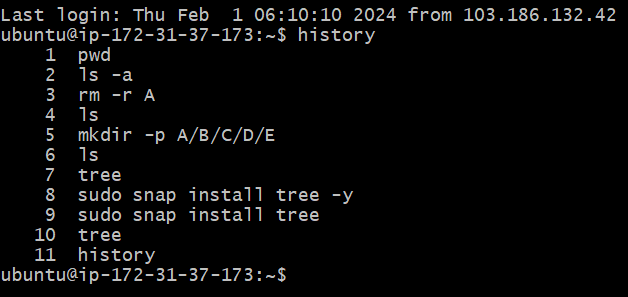
To remove a directory/ Folder.
rmdir Directorynamerm -r Directoryname
To create a fruits.txt file and to view the content.
touch fruits.txtnano fruits.txtvim fruits.txtTo view the content of a file, for ex. fruits.txt
cat fruits.txtnano fruits.txtvim fruits.txtAdd content in devops.txt (One in each line) - Apple, Mango, Banana, Cherry, Kiwi, Orange, Guava.
  # You can use nano or vim editor for adding content to your file.
  for ex.
  nano devops.text
  vim devops.text
note: if you are using nano editor use nano command it will open nano editor after adding content press Ctrl+x then y for yes and hit enter.
If you are using Vim editor then use vim command then hit i for insert then add your content. after adding content hit esc colon wq like this (esc+:+wq) then enter.
To Show only top three fruits from the file.
head -3 fruits.txt
To Show only bottom three fruits from the file.
tail -3 fruits.txt
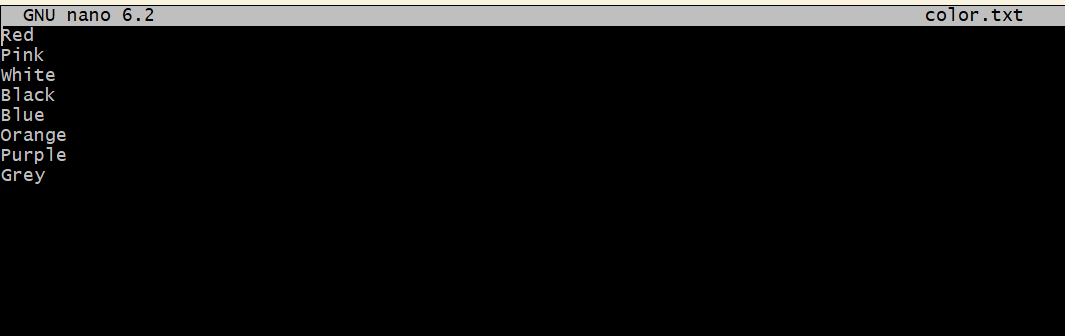
To create another file Colors.txt and to view the content.
nano Colors.txt
Add content in Colors.txt (One in each line) - Red, Pink, White, Black, Blue, Orange, Purple, Grey.
nano Colors.txt
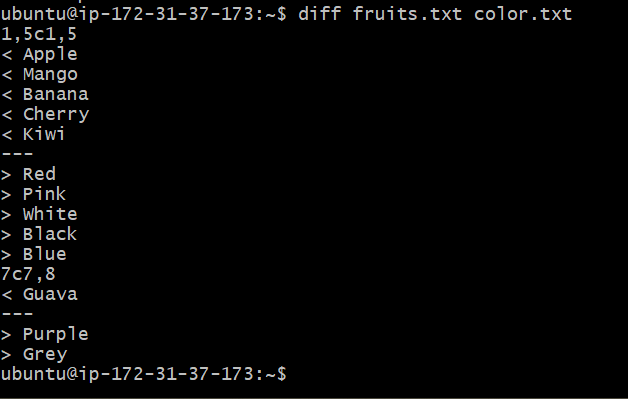
To find the difference between fruits.txt and Colors.txt file.
diff fruits.txt Colors.txt