90DaysOfDevops-Day4

Day 4 - Mastering Basic Linux Shell Scripting for DevOps Engineers 🚀✨
Joining the #90DaysOfDevOps Odyssey: A Game-Changing Initiative by the Visionary Shubham Londhe
Explain in your own words and examples, what is Shell Scripting for DevOps
Shell scripting in DevOps involves writing and executing scripts in languages like Bash or PowerShell to automate repetitive tasks in software development and operations. Examples include automating deployment processes, configuring servers, implementing CI/CD pipelines, analyzing logs, managing user access, and optimizing resources. These scripts enhance efficiency, consistency, and reliability in the DevOps workflow by minimizing manual interventions and ensuring standardized procedures.
What is #!/bin/bash? can we write #!/bin/sh as well?
The #!/bin/bash at the beginning of a script is called a shebang or hashbang. It specifies the path to the interpreter that should be used to execute the script. In this case, #!/bin/bash indicates that the Bash shell should be used to interpret and run the script.Yes, you can also use #!/bin/sh in the shebang line. This specifies that the Bourne shell (sh) should be used as the interpreter. Note that Bash is an extended version of the Bourne shell, and it includes additional features. If your script only uses features that are common to both sh and Bash, using #!/bin/sh is appropriate and allows for greater compatibility across various Unix-like systems.
Write a Shell Script which prints "I will complete#90DaysOofDevOps challenge".
#!/bin/bash
echo "I will complete #90DaysOfDevOps challenge"


Write a Shell Script to take user input, input from arguments and print the variables
#!/bin/bash
echo "Enter a value:"
read userInputargInput=$1
echo "User input: $userInput"
echo "Argument input: $argInput"

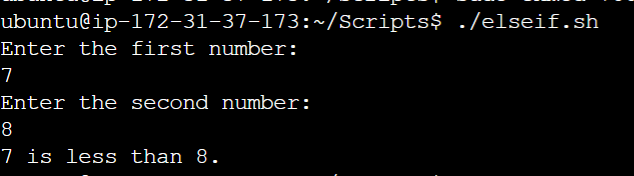
Write an Example of If else in Shell Scripting by comparing 2 numbers
#!/bin/bash
echo "Enter the first number:"
read num1
echo "Enter the second number:"
read num2
if [ $num1 -eq $num2 ]; then
 echo "The numbers are equal."
elif [ $num1 -gt $num2 ]; then
 echo "$num1 is greater than $num2."
else
 echo "$num1 is less than $num2."
fi