90DaysOfDevops-Day6

Day 6 Task: File Permissions and Access Control Lists
Today is more on Reading, Learning and Implementing File permissions
The concept of Linux File permission and ownership is important in Linux. Here, we will be working on Linux permissions and ownership and will do tasks on both of them. Let us start with the Permissions.
- Create a simple file and do
ls -ltrto see the details of the files refer to Notes
Each of the three permissions are assigned to three defined categories of users. The categories are:
owner — The owner of the file or application.
"chown" is used to change the ownership permission of a file or directory.
group — The group that owns the file or application.
"chgrp" is used to change the group permission of a file or directory.
others — All users with access to the system. (outised the users are in a group)
"chmod" is used to change the other users permissions of a file or directory.
As a task, change the user permissions of the file and note the changes after
ls -ltr
Write an article about File Permissions based on your understanding from the notes.
Read about ACL and try out the commands
getfaclandsetfacl
Solution
touch simple_file
ls-ltr

chmod 400 simple_file

Understanding File Permissions in Linux: A Quick Overview
Owner Permissions:
The owner of a file has the highest level of control.
They can read, write, and execute the file.
Group Permissions:
The group to which the file belongs inherits specific permissions.
Members of the group can also read, write, and execute the file.
Other Users Permissions:
All users outside the owner and group fall into this category.
Permissions for other users can be adjusted separately, offering a balance between security and accessibility.
Changing Permissions:
Commands like
chownalter the owner,chgrpmodifies the group, andchmodadjusts permissions.Understanding and managing file permissions is crucial for ensuring the security and accessibility of files in a Linux system.
Read about ACL and try out the commands
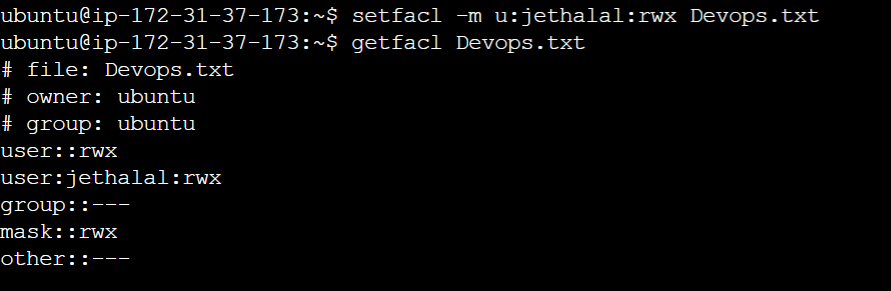
getfaclandsetfaclgetfacl Devops.txt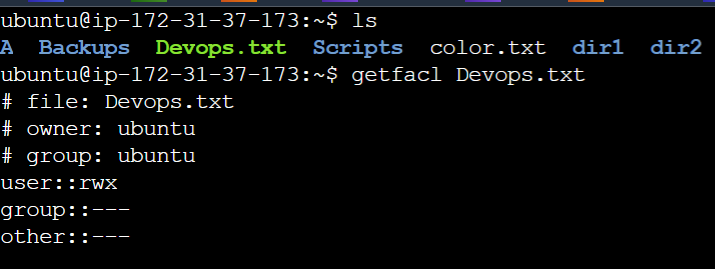
setfacl -m u:jethalal:rwx Devops.txt